
New to AdaL? Learn what AdaL CLI is → · Read the docs →
I cannot be more excited about this milestone. Our team is too busy pushing AdaL to the next one, so there is no fancy launch video yet.
Introducing the new AdaL CLI, with doubled agentic tool use capability across all models. Enjoy the best of each model and balance the cost. The $20 plan may be enough!
New Models
Be a good assistant and give your coding agent the models they need: Gemini 3.1 Pro, Opus 4.6, Sonnet 4.6, Codex 5.2, and Minimax M2.5 Highspeed.
Google — Gemini 3.1 Pro
Gemini 3.1 Pro brings massive context windows and top-tier reasoning capabilities to your terminal.
Anthropic — Claude Sonnet 4.6 & Opus 4.6
Claude Sonnet 4.6 brings improved agentic coding performance with better planning and tool-calling capabilities. Paired with Opus 4.6, you have the ultimate Anthropic powerhouse available immediately via /model.
OpenAI — GPT-5.2 Codex + 9 More
We've added GPT-5.2 Codex along with 9 additional OpenAI models, giving you the latest reasoning and code generation capabilities from OpenAI's lineup.
MiniMax — M2.5 Highspeed
MiniMax M2.5 Highspeed is optimized for faster response times at competitive quality. Minimax is 10x cheaper than Sonnet, with the same level of capability.
UI & Experience
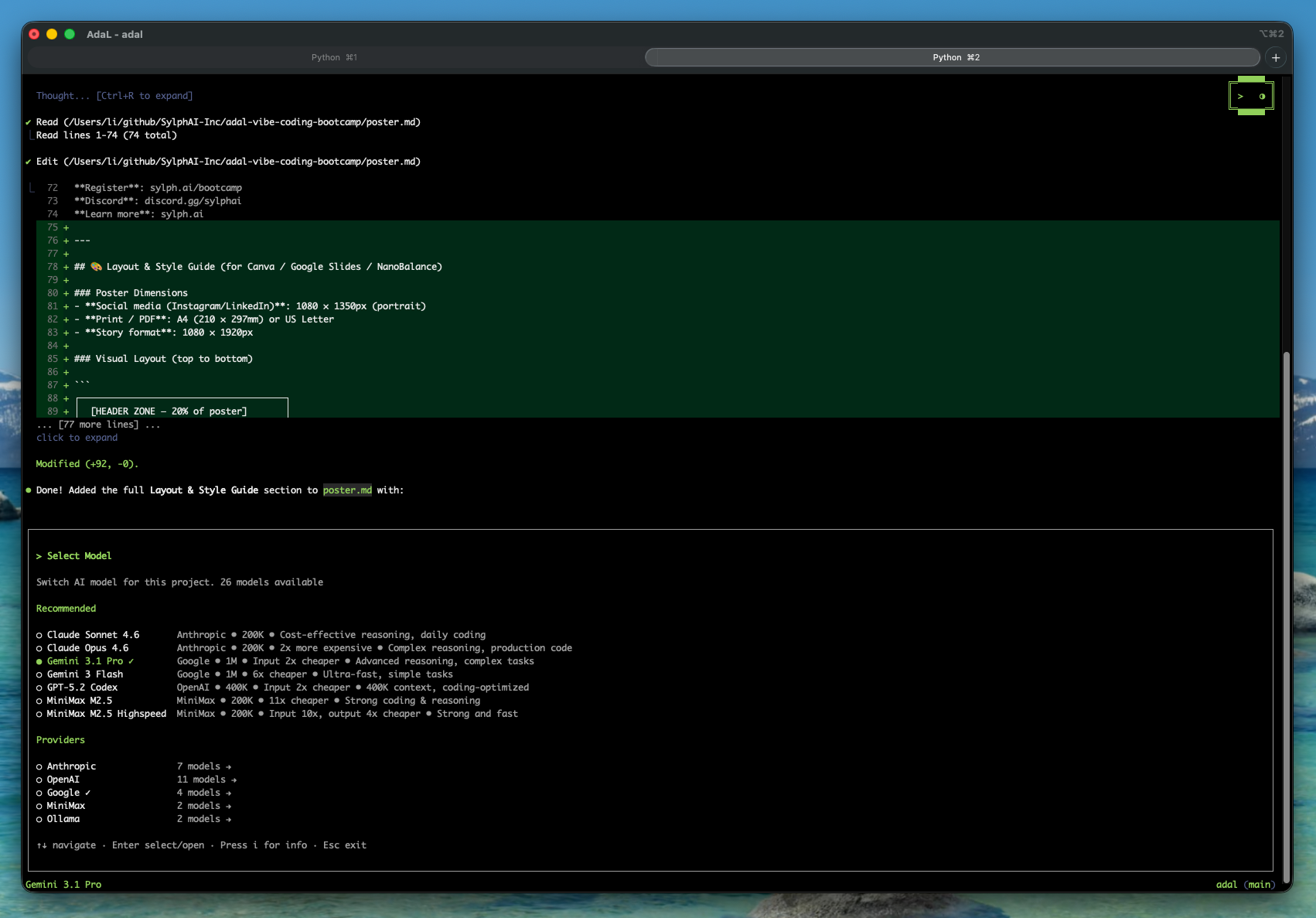
Who said terminal agents have worse UI? No, it is better. Fast, accessible, and packed with shortcuts:
- Click to expand / collapse for lengthy tool outputs, keeping your terminal clean
- Click anywhere in the input to edit your prompt seamlessly
- Inline diff highlighting — The diff view now highlights individual changed characters within lines, making code reviews faster
Redesigned /model Dialog
The model picker has been completely redesigned with provider-specific sections — models are now grouped by Anthropic, OpenAI, Google, and MiniMax, making it faster to find what you need.
Floating Header
A new overlay-style floating header sits in the top-right corner, showing your current model and session info without taking up vertical space.
Theme & Layout
- New theme selection with configurable terminal background colors
- Refreshed user query UI design
- Improved bash confirmation dialog layout with better context
AdaL Web Updates
AdaL Web (adal --web) continues to mature:
- Real-time git branch updates — The file explorer auto-refreshes when you switch branches
- Sidebar diff viewer — Review file changes directly in the sidebar without leaving the chat
Referral Program 🎁
Starting with v0.8.0, we're launching a referral program. Share AdaL with friends — both you and your referral earn credits. Find your unique referral code at adal.sylph.ai/settings/profile.
Get Started
# New install
npm install -g @sylphai/adal-cli

# Update existing
npm update -g @sylphai/adal-cli
This is the last week we are still offering $5 real dollars to all new signups. Do not miss out. Trust me, you will fall in love with AdaL.
Full Changelog
- Doubled agentic tool use and communication across all models
- New models — Google: Gemini 3.1 Pro
- New models — Anthropic: Claude Sonnet 4.6, Opus 4.6
- New models — OpenAI: GPT-5.2 Codex and 9 more
- New models — MiniMax: M2.5 Highspeed
- Redesigned /model dialog with provider-specific sections
- Fast, accessible UI with shortcuts: click to expand, click anywhere to edit
- Improved diff view with inline change highlighting
- Overlay-style floating header on the top right corner
- New theme selection with configurable terminal background
- New user query UI design
- Improved bash confirmation dialog layout
- AdaL Web: real-time git branch updates and auto-refresh file explorer on branch change
- AdaL Web: diff viewer in the sidebar for reviewing changes
Share Your Feedback
Join the Discord Community to share your feedback, or reply to the product update email.