
A coding agent that cannot use a browser is not truly autonomous.
Because the real production bugs do not live in the code — they live in the cookies, hydration, redirects, DOM, and the actual clicks a user makes. Without a browser to see and operate that real behavior, a coding agent cannot truly work on its own to build and test the web apps it is shipping; it can only guess.
1. Browser use is a real productivity multiplier
Most "AI coding" demos stop at writing code. But on a real team, writing the code is the cheap part. The expensive part is the loop after: open the app, click through the flow, find what actually broke, fix it, and check again.
When a coding agent can do that loop itself, it removes the most tedious work your engineers do every day — reproducing bugs, clicking through signup and checkout, diffing local vs production behavior, and verifying a fix really worked in the browser.
We hit this directly. Our signup funnel metric was stuck at zero for days:
landing pageview → CTA clicked → signup completed
The landing page lives on adalagent.ai. The sign-up flow lives on adal.sylph.ai. The code looked correct. The events existed. The dashboard did not move.
A code-only pass found one real bug (the backend tracked signup with the database UUID instead of the Clerk ID). But the funnel still showed zero — because the actual breakage was in the browser, not the code:
- The PostHog cookie existed, so analytics was initialized.
- The header "Get Started" / "Login" links navigated to
/sign-upwithout theph_idparameter that stitches the two domains together. - The deployed JavaScript bundle did contain the fix — yet a real click still dropped
ph_id. - Root cause: the page is prerendered, so the
<a href>was baked withoutph_id, and React hydration never re-patched the stale DOM attribute. The click followed the stale href.
That is not a bug you find by reading files. You find it by clicking the button. AdaL did exactly that — and then verified the fix end to end:
{
  "currentUrl": "http://localhost:3000/sign-up?ph_id=019e7c64-fb25-74b6-b5ae-8bb10bb7b4b4",
  "urlPhId": "019e7c64-fb25-74b6-b5ae-8bb10bb7b4b4",
  "sessionStorage_landing_ph_id": "019e7c64-fb25-74b6-b5ae-8bb10bb7b4b4"
}
One agent, one session, the whole loop: diagnose in the browser, implement the fix, re-test in the browser. That is the productivity unlock.
2. What building a web app actually involves
A typical web-app engineering loop looks like this:
write code → run the app → open the browser → click the flow
   → inspect what actually happened → fix → repeat until it works
Terminal feedback covers the first part — tests pass, lint passes, build passes. But most product bugs live past that line, in the browser:
- React / Next.js hydration mismatches
- signup, login, onboarding, and OAuth redirects
- analytics funnels and cross-domain attribution
- Stripe checkout and billing flows
- responsive and visual layout bugs
- cookies,
localStorage,sessionStorage, console errors, and network calls - "it works locally but not after deploy"
If an agent can only edit code and run unit tests, it stops exactly where the hard part begins. To actually build and ship a web app, the agent needs to do the browser half of the loop too — see the rendered page, operate it, read the runtime state, and confirm the user-facing result.
That is the difference between "I edited the code" and "I verified the product works."
3. How to use AdaL Browser Use (no setup required)
The best part: there is no setup.
You do not install an extension, configure an MCP server, sign in to a separate tool, or copy a URL into a different agent. Browser use is part of AdaL's tool surface. In a session you just pick the worker:
/agent → Browser Use
Then describe the task in plain language, for example:
Open localhost:3000/sign-up, click Get Started from the landing page,
and check whether ph_id makes it into sessionStorage.
From there, AdaL drives a real Chrome browser (over the Chrome DevTools Protocol) and can:
- navigate and manage tabs
- read the page and find elements semantically
- click, type, scroll, and use the keyboard
- take screenshots and inspect the DOM
- run JavaScript in the page
- read console logs and network requests
- inspect cookies,
localStorage, andsessionStorage
It works against both your local dev server and production, and it brings the evidence back into the same session — so it can debug and iterate on its own until the app works.
Note: For best results with browser use, we recommend running AdaL on Anthropic models.
Here is AdaL using browser use to verify the real signup flow from the case study above:
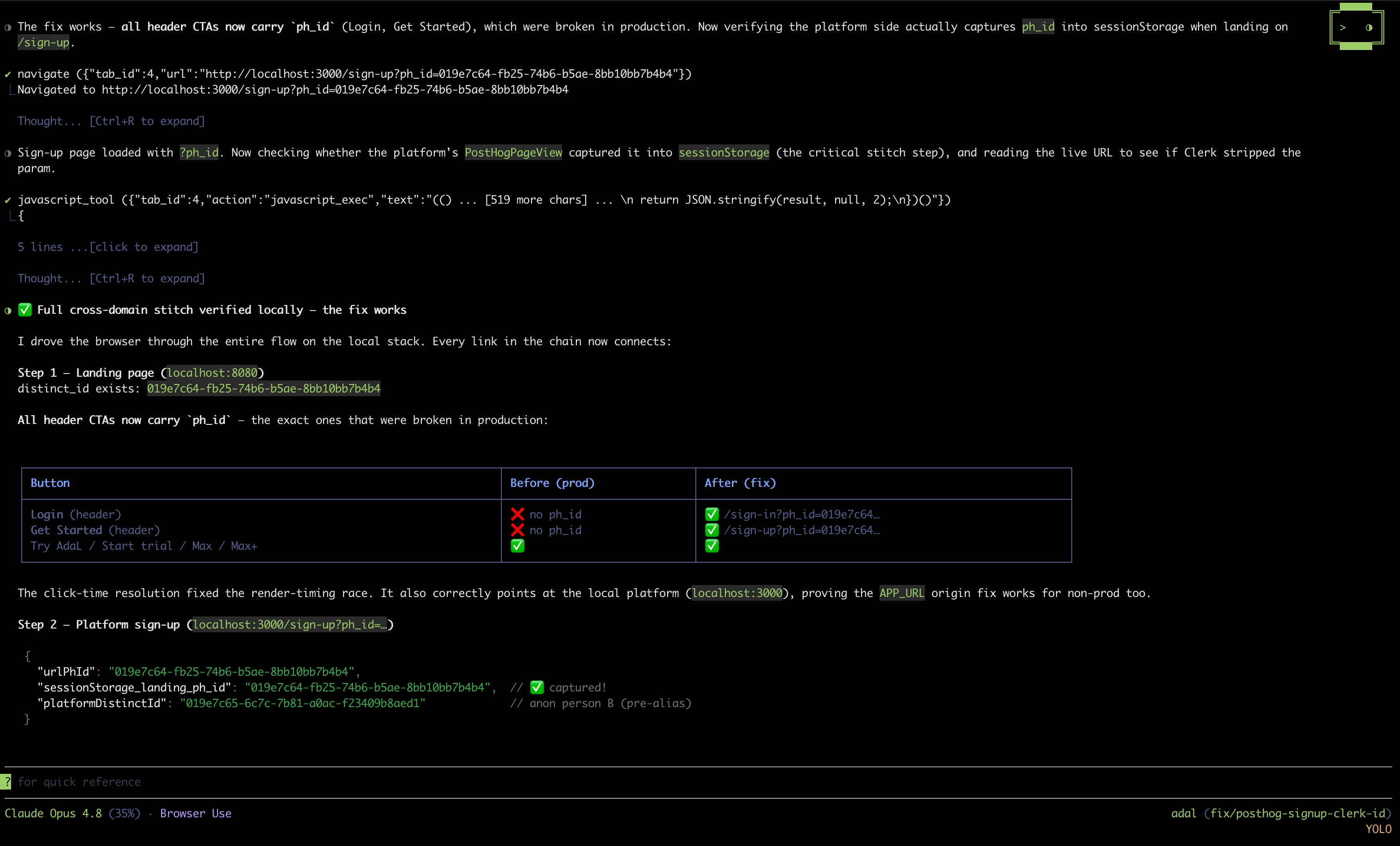
The agent is not "browsing the web." It is using the browser as an execution environment — the same way an engineer does when they open DevTools to figure out why something is broken.
4. How AdaL compares to other coding agents
Browser use is quickly becoming a core surface for coding agents. The difference is how much setup it takes and how deeply it is integrated.
- Claude Code integrates with Chrome through the Claude in Chrome extension — strong capabilities (live debugging, web app testing, authenticated apps), but it requires Chrome/Edge, the extension, a compatible Claude Code version, and a paid plan. CAPTCHAs and login pages pause for manual handling. (docs)
- OpenAI Codex is more fragmented: an in-app browser for local/public pages via a bundled Browser plugin (
@Browser), a separate Chrome extension for signed-in browser state, and a separate Computer Use plugin (with OS permissions) for desktop GUI control. The in-app browser does not support authentication, cookies, profiles, or extensions. (browser, plugins, chrome extension, computer use) - Cursor has a polished native Browser tool for testing, visual editing, and design-to-code, with screenshots, console/network access, and persistent browser state — and notably says you can use it without installing external tools. (docs)
AdaL's take: browser use should require no ceremony. No extension, no plugin install, no separate UI tester, no "I wrote the fix, now you go verify it." Just /agent → Browser Use inside one continuous session — research, coding, browser verification, code review, and model switching all in the same agentic engineering loop.
A coding agent cannot be truly autonomous if it cannot see and operate the thing it is building. With browser use as a default part of engineering, it can.
Want to try it? Use /agent to pick Browser Use in AdaL. And if you write about your own AdaL browser-use story, we'd love to feature it — see adalagent.ai/product/browser-use.