
By Aria Shi · July 31, 2026
TL;DR
In 5 minutes, you'll understand Skills, how they differ from MCPs and AGENTS.md, and discover how Skills let your AI automatically reuse workflows instead of starting from scratch every chat.
If you have used an AI agent for a while, you have probably repeated the same instructions many times.
You provide the same context, reference files, rules, and output requirements. Then you fix the same mistakes because what worked in one conversation is not automatically preserved for the next.
Every new chat can feel like onboarding a new employee on their first day.
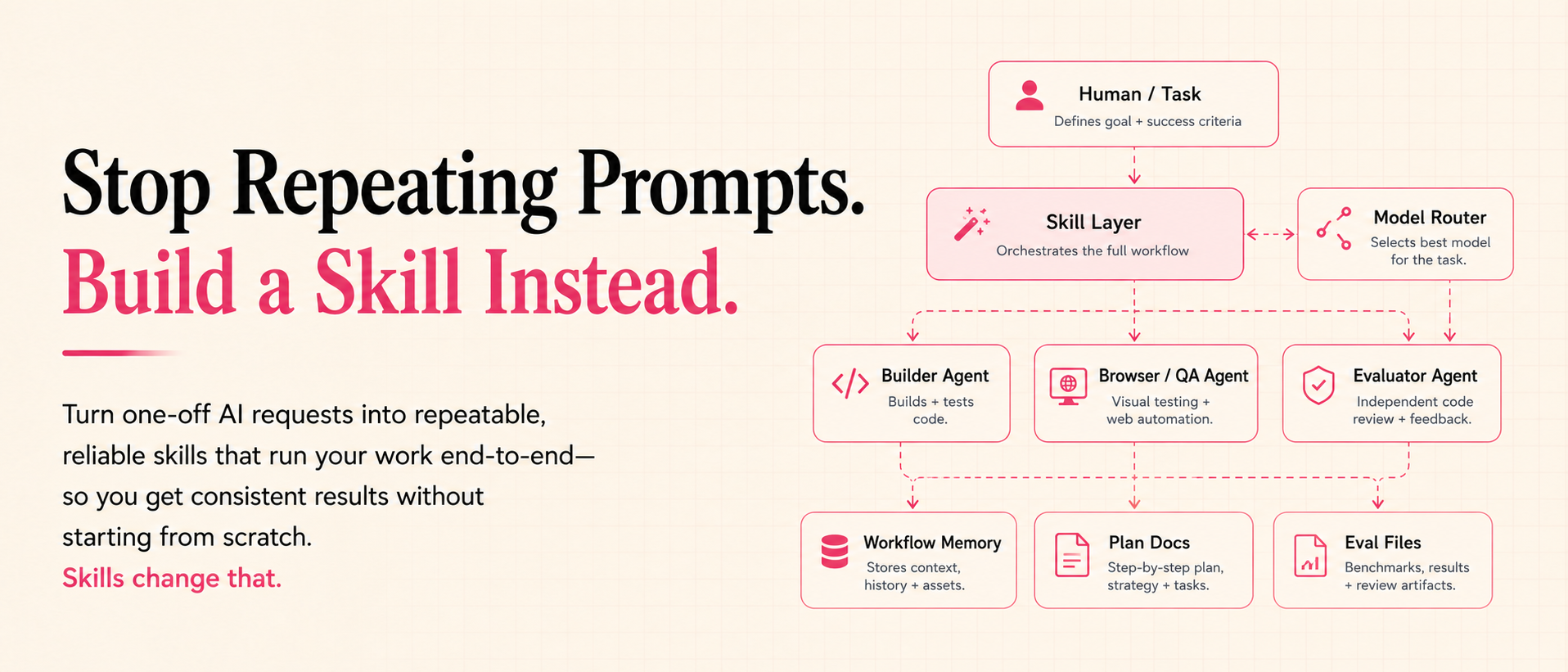
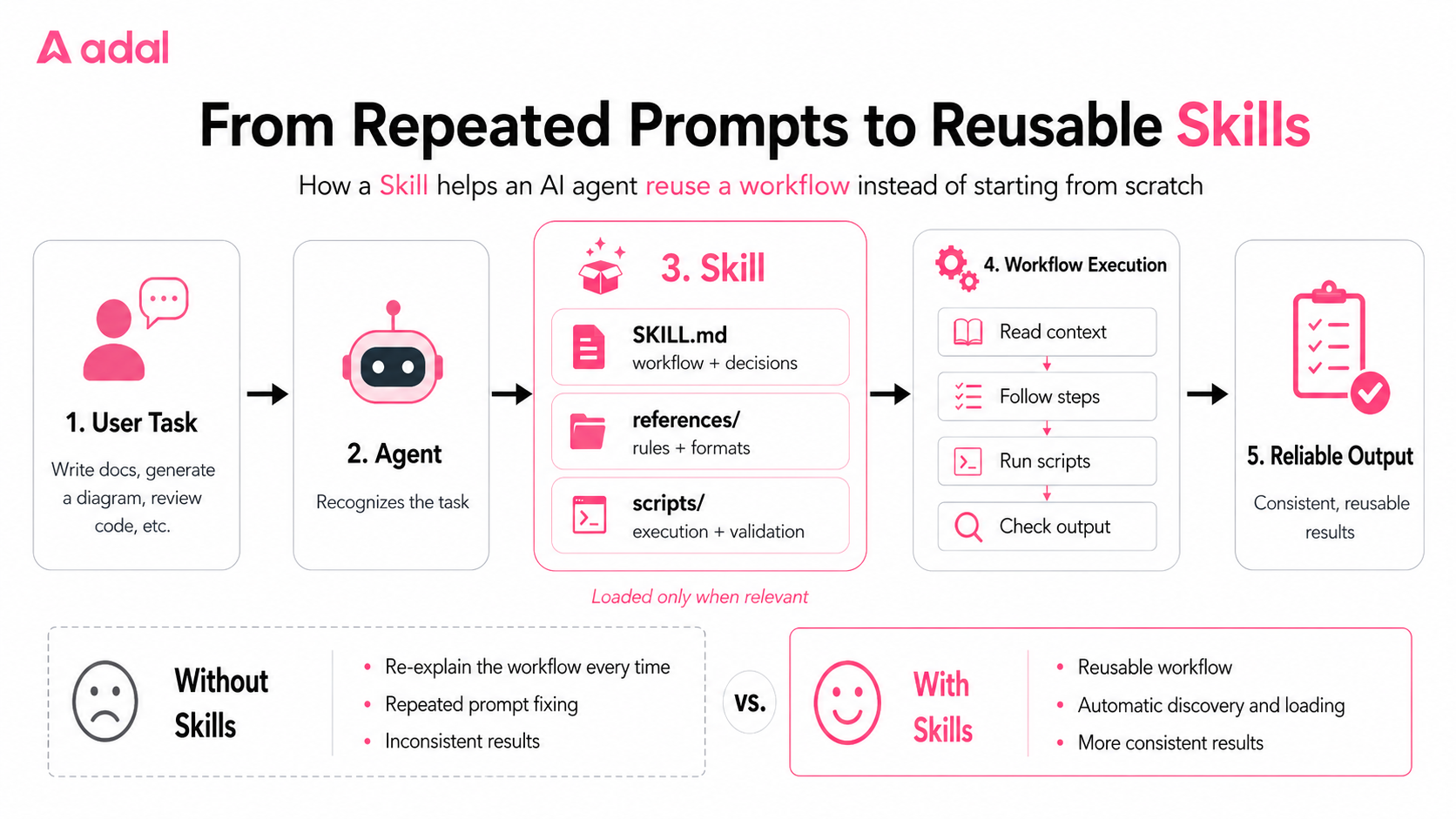
Skills teach agents how to carry out an entire workflow repeatedly and reliably [1, 2]. A Skill is not a longer prompt. It is a reusable workflow that the agent can automatically discover, load, and apply when the right task appears.
What Is a Skill?
A Skill is a reusable capability package for an AI agent [2, 3].
Instead of entering the same instructions in every conversation, you place the relevant knowledge inside a folder. That knowledge can include the context the agent needs, the steps it should follow, the rules it must respect, the expected output format, and any scripts required to execute or validate the work.
When a new task matches the Skill's purpose, the agent can discover and load the Skill automatically [1].
You are no longer giving the agent a one-time prompt. You are giving it a reusable playbook.
| AGENTS.md | MCP | Skill | |
|---|---|---|---|
| Purpose | Project instruction | Connect tools | Package workflows |
| Loaded | Always | Manual/Infrastructure | Only when needed |
| Contains | Context | Tools | Workflow + Rules + Scripts |
AGENTS.md provides repository-level instructions, MCP standardizes connections to external systems and tools, and Skills package reusable workflows that load when relevant [4, 5].
How to Write a Skill
A well-designed Skill usually contains three types of components: instructions, references, and scripts [2].
The most important file is SKILL.md. You can think of SKILL.md as the team lead. It tells the agent which decisions to make, which files to read, which scripts to run, and how to determine whether the task is complete.
The references/ directory contains the shared rules and domain knowledge behind the workflow. It might define a JSON schema, an API convention, a writing style, a diagram format, or an internal engineering standard.
The scripts/ directory handles work that needs to be deterministic. A script can calculate a layout, transform data, generate a file, run tests, or validate an output [6].
In practice, these components work together. SKILL.md defines the workflow, references/ defines the rules, and scripts/ executes or verifies the work.
A simple writing Skill may only require SKILL.md. A more advanced Skill that generates files or works with structured data will often benefit from references and scripts as well.
How to Install Skills
Skills can come from three different places, depending on who should use them and how they should be shared [1].
Personal Skills
Personal Skills are stored in your home directory:
~/.adal/skills/
They capture your own preferences and repeated workflows.
This makes them useful for workflows based on your personal preferences. You might create a Personal Skill that formats code in your preferred style, writes documentation in your usual tone, generates diagrams using a consistent visual language, or applies your own review checklist.
They are available everywhere for you, but only for you.
Project Skills
Project Skills live inside a specific repository:
.adal/skills/
They travel with the repository and preserve team knowledge.
Because the directory is part of the project, it can be committed to Git alongside the source code. Anyone who clones the repository receives the same Skills.
Plugin Skills
Plugin Skills come from external repositories and make community-built workflows installable.
After installation, the agent can automatically load the relevant Skill when a matching task appears.
They follow a three-level hierarchy:
Marketplace
└── Plugin
    └── Skill
To install a Plugin, first add the Marketplace:
/plugin marketplace add <github-url>
Then install the Plugin:
/plugin install <plugin-name>
After installation, you do not need to manually activate the Skill every time you use it.
Let's Build One: GlowMotion
Imagine you've saved dozens of great blog posts and research papers, but never actually read them.
You skim the title, think "I'll come back to this later," and hit the bookmark. When you finally do, you spend 20 minutes reading only to realize it wasn't what you were looking for. Over time, your reading list becomes a graveyard of articles you'll probably never finish. The problem isn't finding good content—it's quickly understanding whether it's worth your time.
So instead of reading everything line by line, what if your AI could give you the big picture first?
Let's build a Skill to solve this: GlowMotion.
The user only needs to provide the source and describe the desired result. Behind the scenes, the agent fetches the content, identifies its key components and relationships, converts that information into a semantic graph, renders a self-contained HTML diagram, and validates the output before delivery [7].
The final result can include glowing comet dots, flowing connectors, animated request paths, dark and light themes, and built-in presentation controls.
The complete workflow begins with one prompt and ends with a browser-ready HTML file.
Here is the GlowMotion folder structure:
glowmotion/
├── SKILL.md
├── references/
│   └── graph-format.md
└── scripts/
    ├── layout.py
    ├── check_diagram.py
    └── check_fidelity.py
Each part of the folder has a specific responsibility. SKILL.md defines the workflow. graph-format.md defines the semantic graph format. The scripts render the diagram and verify that the result is structurally correct.
Step 1: Write SKILL.md — The Workflow
SKILL.md tells the agent when to use the Skill and what steps to follow. For GlowMotion, the agent recognizes requests like flowchart or architecture diagram, converts the content into a semantic graph, renders it into HTML, and validates the result.
Step 2: Add references/ — The Rules
Store shared rules and formats in references/. For GlowMotion, graph-format.md defines the graph schema so both the agent and scripts work from the same specification.
Keeping these rules separate from the main workflow makes the Skill easier to understand, maintain, and update.
Step 3: Add scripts/ — The Execution
Put deterministic work in scripts/. layout.py renders the diagram, while validation scripts check the layout and ensure the output matches the source.
The agent handles the flexible work of understanding and organizing the content. The scripts handle the exact work of rendering and validation. Together, they make the Skill reliable enough to reuse.
Step 4: Install the Skill
Install GlowMotion from the AdaL Skills Marketplace [1, 8]:
/plugin marketplace add SylphAI-Inc/skills
/plugin install core-skills@adal-agent-skills
Verify the installation with:
/skills
Once installed, GlowMotion is automatically discovered and loaded whenever a matching task appears—no manual activation required.
Using the Skill in Practice
Now you can give the agent a real task:
Use GlowMotion to generate a diagram for:
https://x.com/panda_liyin/status/2074933173318984174
The Skill handles the rest:
- Read the source.
- Extract the key components.
- Identify the relationships.
- Build a semantic graph.
- Render an HTML diagram.
- Validate the layout.
- Fix problems before delivery.
Without the Skill, the user would need to describe and supervise this workflow every time.
With the Skill, the process is already defined.
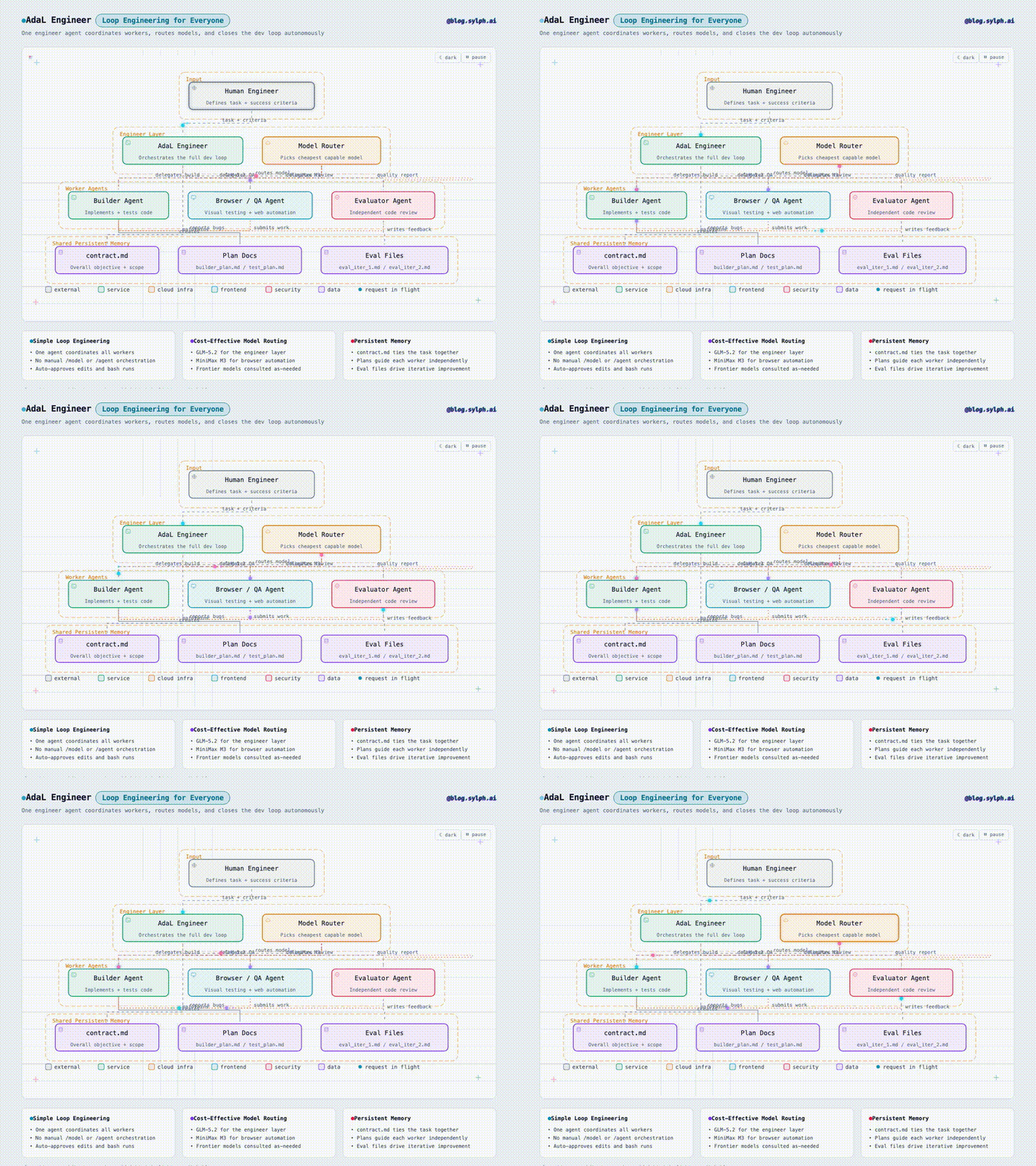
Here is the diagram for Loop Engineering For Everyone.
From Repeated Prompts to Reusable Skills
A Skill turns a repeated workflow into a reusable capability. Start with one task, define the process clearly, and improve it over time. Whether you're capturing your own workflow, sharing engineering knowledge with a team, or installing community-built capabilities, Skills make your AI agent more consistent, reliable, and easier to improve over time.
Building your first Skill is surprisingly simple. Start with one repetitive task, write down the workflow, and let the agent reuse it from then on.
AdaL automatically discovers and loads the right Skill when it is needed [1].
Write once. Reuse everywhere.
References
- AdaL, "Skills & Plugins." https://docs.sylph.ai/features/plugins-and-skills/
- Agent Skills, "Specification." https://agentskills.io/specification
- Anthropic, "Equipping Agents for the Real World with Agent Skills." https://www.anthropic.com/engineering/equipping-agents-for-the-real-world-with-agent-skills
- AGENTS.md, "A Simple, Open Format for Guiding Coding Agents." https://agents.md/
- Model Context Protocol, "What Is the Model Context Protocol?" https://modelcontextprotocol.io/docs/getting-started/intro
- Agent Skills, "Using Scripts in Skills." https://agentskills.io/skill-creation/using-scripts
- SylphAI, "GlowMotion Skill." https://github.com/SylphAI-Inc/skills/tree/main/skills/glowmotion
- SylphAI, "AdaL Skills Marketplace." https://github.com/SylphAI-Inc/skills